
Why Magento ERP integrations fail: and what it actually takes to run them properly
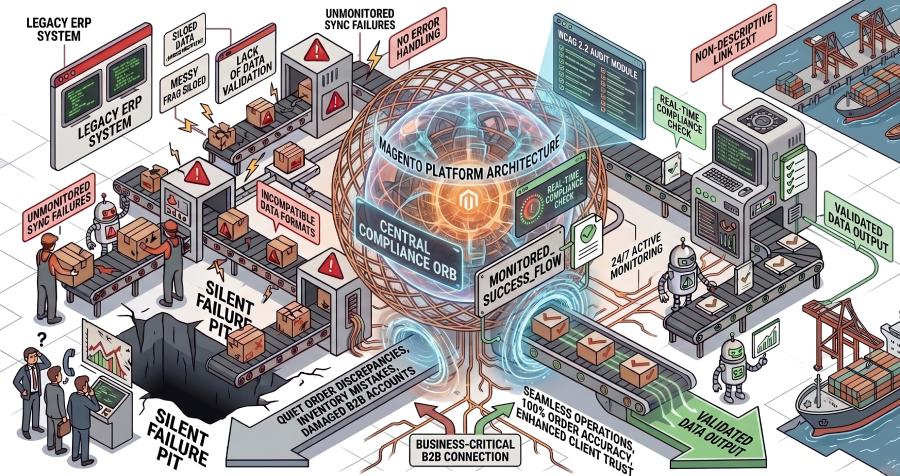
The ERP integration is the most business-critical component of most B2B Magento platforms. It is also the one most likely to fail quietly, at scale, without anyone noticing until a wholesale account calls to report an order discrepancy.
Stock that does not exist gets sold. Pricing that was updated in the ERP resolves incorrectly at the checkout. Orders that are completed in Magento never reach the fulfilment system. None of these failures are announced. They accumulate, compound, and surface commercially: during peak trading, during a month-end order run, during the one moment when the platform can least afford an incident.
This article explains why Magento ERP integrations fail in the specific ways they do, what the three integration approaches actually involve and where each one breaks, and what it takes to run a Magento ERP integration with genuine stability rather than managed fragility.
Why Magento ERP integrations fail differently from other integrations
Most integration failures are recoverable. A payment gateway goes down; the checkout errors visibly and the customer tries again. A marketing tool disconnects; emails stop sending until someone notices in the dashboard. These failures are contained.
ERP integration failures are not contained. The ERP is the source of truth for inventory, pricing, customer data, and order state. When the ERP integration drifts, every system that depends on it inherits the error. The Magento storefront shows stock that does not exist. The ERP records an order state that Magento has already superseded. The finance team reconciles against figures that are weeks out of date.
Three structural factors make Magento ERP integrations uniquely prone to failure.
1.The integration surface is enormous
A Magento ERP integration typically covers: product catalogue and inventory sync, order creation and status updates, customer account and pricing data, invoice and credit note processing, and returns handling. Each data flow runs in both directions, each has its own sync frequency, and each has its own failure mode. A B2B deployment adds account hierarchy, tiered pricing by customer group, and approval workflow state on top of that.
2. Failure modes are silent by default
Out-of-the-box Magento ERP integrations do not fail loudly. A message queue backs up under load and stops processing. A sync timeout is swallowed and logged, not alerted. An order state diverges between systems because a field mapping was changed in a deployment and nobody updated the integration. The platform looks healthy. The business does not know until the damage is already commercial.
3. Most integration implementations are built to a budget, not to a risk profile
ERP integrations are scoped and priced at the start of a project. The budget covers the build. It rarely covers the ongoing monitoring infrastructure, the error handling logic that accounts for real-world data edge cases, or the senior engineering time required to maintain the integration as both Magento and the ERP evolve. The result is an integration that works under ideal conditions and fails under the conditions that actually occur in production.
The five most common Magento ERP integration failure modes
1. Message queue failure under load
Magento uses a message queue architecture for ERP sync operations. Under normal load, queues process reliably. Under B2B peak load conditions (a concentrated order run from multiple wholesale accounts, a month-end processing spike), queues back up faster than they are consumed. Unprocessed messages accumulate. Orders stop syncing. Inventory updates stop flowing.
The failure is invisible until someone checks the queue depth, which most teams do not monitor actively. By the time it is caught, the backlog may represent hours of unsynced order data.
2. Pricing logic divergence
B2B pricing in Magento is layered: base price, customer group rules, tier pricing, catalogue price rules, cart rules, and ERP-synced contract pricing. ERP pricing data is typically synced on a schedule: hourly, daily, or on trigger. When a pricing change is made in the ERP between sync cycles, Magento resolves the old price. When the integration itself has a field mapping error, Magento resolves an incorrect price that may be within a plausible range and therefore not immediately visible.
Revenue leakage from pricing divergence is one of the hardest failure modes to detect because no error is thrown. The order is processed, the invoice is generated, and the discrepancy only surfaces during financial reconciliation, weeks or months later.
3. Data mapping failures after deployment
ERP integrations are built against a specific data structure on both sides. When either system changes (a Magento deployment that updates a custom attribute, an ERP upgrade that renames a field), the mapping breaks. If the deployment process does not include integration validation as a step, the break can persist through to production and accumulate errors for days before it is caught.
This is one of the most common sources of ERP integration incidents in platforms that are actively developed. Every deployment is a potential integration break, and most deployment pipelines are not built to test it.
4. Error handling that logs but does not alert
Most Magento ERP integrations have error logging. Very few have active alerting configured. The distinction is the difference between knowing something broke and knowing it in time to do something about it. An integration that logs sync failures quietly will accumulate thousands of errors before anyone checks the logs. An integration with alerting configured surfaces the first error immediately.
The absence of active alerting is almost universal in integrations built under agency model engagements, because configuring and maintaining alerting infrastructure was not in the project scope.
5. SAP and complex ERP-specific problems
Standard out-of-the-box connectors between Magento and major ERPs rarely survive contact with a production SAP environment. SAP implementations almost always have custom data structures, company-specific pricing logic, and multi-entity configurations that generic connectors are not built to handle. The result is an integration that passes UAT (because UAT runs against a subset of the real data) and fails in production when it encounters the edge cases the connector was not designed for.
SAP integration on Magento requires either a certified SAP connector built to the specific implementation, or a custom middleware layer that maps the SAP data model to Magento’s integration surface. Both require senior engineering time to build correctly, and ongoing senior ownership to maintain.
The three integration approaches: what they actually involve and where each breaks
Approach | What it covers | Where it breaks |
Native connector | Pre-built connector from an extension vendor. Lowest upfront cost. Fastest to deploy. | Rarely holds for stores processing more than 200 orders per day. No flexibility for custom data structures. ERP-side customisations require workarounds that compound over time. |
Middleware platform (MuleSoft, Boomi, Celigo) | Integration platform that manages data flow between Magento and ERP. Suited to multi-system environments. Carries annual licensing costs. | Licensing cost is ongoing and scales with usage. Configuration requires specialist knowledge. Middleware failures can be harder to diagnose because the error is in a third system, not in Magento or the ERP. |
Custom API integration | Bespoke integration built to the specific Magento implementation and ERP data model. Right for heavily customised platforms or complex B2B workflows. | Requires senior engineering time to build correctly. Without ongoing ownership, custom integrations accumulate technical debt and become brittle as either system evolves. Knowledge loss is severe when the original developer leaves. |
The integration method matters, but it is not the primary determinant of whether the integration runs reliably. Platforms with native connectors can run stably under proper ownership. Platforms with custom API integrations can collapse when the ownership model changes. The method sets the ceiling; the ownership model determines whether you reach it.
Why the agency model makes ERP integration failures worse
The agency model is built around projects. A scope is defined, the integration is built, and the engagement closes. There is no structural mechanism for an agency to monitor ERP integration health between projects, respond to queue failures at 2am, or catch a pricing divergence that started three deployments ago.
The specific consequences for ERP integrations are:
- Junior developers handle support tickets. ERP integration failures (queue architecture, pricing resolution logic, SAP field mapping errors) require senior-level diagnosis to identify correctly. Junior diagnosis produces incorrect fixes that mask the symptom without addressing the root cause.
- Knowledge resets between projects. The developer who built the integration is not the developer handling the support ticket six months later. The context that makes the failure mode understandable is gone.
- Deployment pipelines do not test integration health. A standard Magento deployment checklist validates storefront functionality. It does not validate ERP sync state, queue health, or pricing resolution by customer group before go-live.
- No one monitors queue depth between incidents. Queue backup is the most common ERP integration failure mode and also the most preventable. It requires active monitoring to catch. Without ownership of that monitoring, it is only caught when it has already caused damage.
- Error alerting is not configured. Integration errors are logged. They are not surfaced to anyone until a commercial incident triggers a ticket.
What architecture ownership means for Magento ERP integrations
The difference between an ERP integration that runs reliably and one that fails repeatedly is not the integration method. It is the ownership model applied to it.
Architecture ownership of a Magento ERP integration means:
- Active monitoring of queue depth, sync latency, and error rates, with alerting configured for deviation from baseline and not just for catastrophic failure
- Deployment pipelines that validate integration health as a step, not an afterthought: ERP connectivity checks, queue health validation, and pricing resolution testing by customer group before every release
- Senior engineers who understand both the Magento integration surface and the ERP data model, and who hold that understanding continuously, not re-derived from logs at the start of each incident
- Error handling logic built to production reality, not to UAT conditions: edge case handling, retry logic, and dead-letter queue management that accounts for the data patterns that actually occur in your business
- A named accountable owner who is responsible for integration health between incidents, not just during them
In practical terms, this means ERP integration failures move from reactive incidents (discovered commercially, addressed under pressure) to proactive catches: a queue backup flagged and resolved before it affects order processing, a data mapping error caught in the deployment pipeline before it reaches production, a pricing divergence identified during a routine audit rather than during a financial reconciliation.
How to assess whether your current ERP integration is at risk
Most ERP integration risk is not visible in the platform dashboard. It is visible in the operational patterns around the integration: how failures are discovered, how long they take to resolve, and how often the same failure mode recurs.
Signals that your Magento ERP integration is carrying unmanaged risk:
- ERP sync errors are logged but you have no active alerting configured
- Your deployment process does not include an ERP connectivity check or queue health validation before go-live
- You have had pricing discrepancies that were discovered during financial reconciliation rather than caught before an order was processed
- Queue depth is not something your team monitors actively
- The developer who built your ERP integration no longer works on the platform
- You are not certain whether your current integration would hold under your peak-load order volume
- The last time you reviewed your error handling logic was at the time of the original implementation
Frequently asked questions
Why do Magento ERP integrations fail so often?
Most Magento ERP integrations fail for three structural reasons: they are built to a budget that does not cover proper error handling and monitoring infrastructure; they are not owned between projects, so failures accumulate undetected; and deployment pipelines rarely test integration health before go-live. The integration method matters less than the ownership model applied to it.
What is the most common cause of Magento ERP sync failure?
Message queue failure under load is the most common cause of serious ERP sync problems in B2B Magento deployments. Under peak order volumes, message queues back up faster than they are processed, and unprocessed messages accumulate. Without active queue depth monitoring, this failure mode is invisible until it has produced hours of unsynced order data. Pricing logic divergence across multiple sync cycles is the second most common source of recurring ERP issues.
Should I use a native connector, middleware, or custom API integration for Magento ERP?
The right approach depends on your ERP implementation, order volume, and the complexity of your data model. Native connectors are the fastest and cheapest to deploy but rarely hold above 200 orders per day and have no flexibility for custom data structures. Middleware platforms suit multi-system environments but carry ongoing licensing costs and require specialist configuration. Custom API integrations are right for heavily customised platforms or complex B2B workflows, but require senior engineering time to build and ongoing ownership to maintain. The integration method sets the ceiling; the ownership model determines whether you reach it.
How do I know if my Magento ERP integration is working correctly?
Reliable indicators include: active monitoring of queue depth with alerting configured for deviation from baseline; no unexplained pricing discrepancies in financial reconciliation; order state in Magento consistently matching order state in the ERP; integration health validation included in your deployment pipeline; and a defined owner who reviews integration health proactively. If any of these are absent, your integration is likely carrying undetected risk.
What does Magento ERP integration monitoring actually involve?
Effective ERP integration monitoring covers: message queue depth and processing rate with alerting when depth exceeds a defined threshold, sync error rate and error type categorisation, sync latency against baseline, order state consistency checks between Magento and the ERP, and pricing resolution accuracy by customer group. Most of this monitoring needs to be configured actively; it is not available out of the box from either Magento or the ERP.
Can a Magento ERP integration be fixed without rebuilding it?
In most cases, yes. A full rebuild is rarely necessary. The most common remediation path involves: configuring active monitoring and alerting on the existing integration, improving error handling and retry logic, adding integration health validation to the deployment pipeline, and conducting a data mapping audit to identify any divergence that has accumulated. The integration architecture may need adjustment in some cases, but the majority of reliability problems are ownership problems, not architectural ones.
How is Foxycom's approach to ERP integration different from an agency?
Foxycom takes ownership of the ERP integration as a continuous responsibility, not a project scope. This means active monitoring of queue health, sync latency, and error rates; deployment pipelines that validate integration health before every release; senior engineers who hold working knowledge of both the Magento integration surface and the ERP data model continuously; and named accountability for integration health between incidents. An agency responds when something breaks. Foxycom is accountable for ensuring it does not.
Not sure whether your Magento ERP integration is carrying undetected risk?
Foxycom runs free 20-minute architecture reviews for B2B and wholesale brands on Magento. In that call, a senior engineer looks at your ERP integration setup, queue configuration, deployment pipeline, and pricing logic to identify the specific risks most likely to affect your platform.
No pitch. No obligation. Just a senior engineer’s honest view of where your integration stands.