
How custom pricing and RFQs work in Magento B2B – and why getting them wrong costs you wholesale accounts
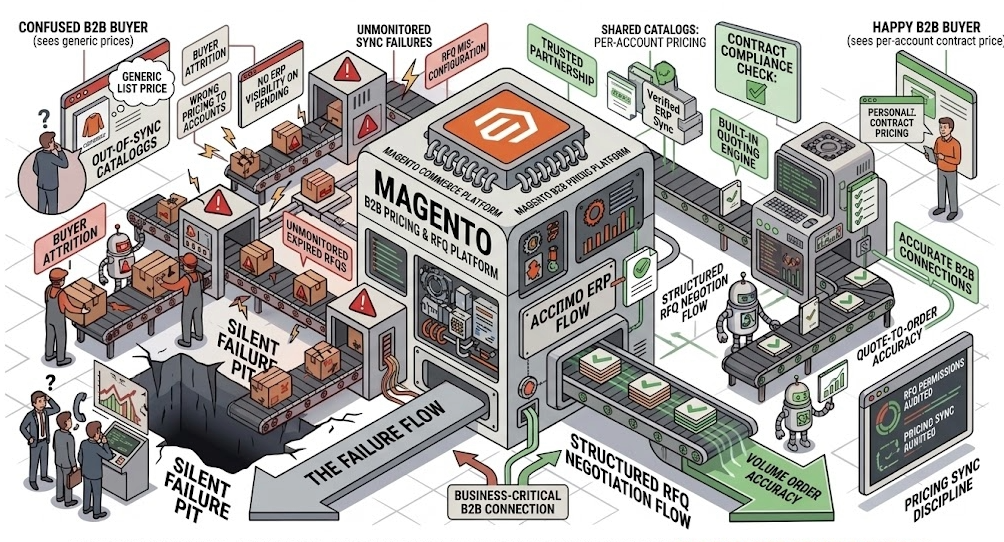
B2B buyers do not expect to pay the same price as everyone else. They expect the price they were promised: the one negotiated in a contract six months ago, the one that reflects their order volume, the one that applies to their account and no other.
When a wholesale buyer logs into a Magento storefront and sees a generic list price, one of two things happens. They call your sales team to find out what is going on, which costs time. Or they leave, which costs revenue.
Magento and Adobe Commerce B2B have the tools to handle this correctly. Shared Catalogs give you per-account pricing visibility. The built-in quoting engine lets buyers initiate formal price negotiations directly from the storefront without involving email. But both systems require deliberate configuration and ongoing ownership to work as intended. Neither is plug-and-play.
This article explains how Magento’s custom pricing and RFQ machinery actually works, where the most common implementation failures live, and what it takes to run these features reliably at scale.
Why B2B pricing is not a product catalogue problem
The instinct on most Magento implementations is to treat pricing as a product attribute. Set a base price, apply a tier rule, move on. For B2C, that is largely sufficient. For B2B, it is the wrong model.
B2B pricing is an account relationship, not a product property. The same SKU may legitimately carry five different prices across five wholesale accounts, each reflecting a different contract, a different volume commitment, and a different negotiation history. None of those prices should ever be visible to the wrong account.
The three pricing layers that matter in a B2B context:
layer 1
Tiered pricing
Volume-based discounts applied automatically when a buyer meets a quantity threshold. No account-specific logic required.
layer 2
Customer group pricing
Different base prices by segment: wholesale, trade, distributor. The minimum viable model for most B2B implementations.
Layer 3 – the one that matters
Shared Catalog pricing
Account-specific pricing and product visibility, assigned per company. What serious B2B pricing requires, and the layer most implementations under-invest in.
The failure mode in B2B pricing is not usually that the wrong price is shown. It is that the wrong price is shown to the wrong account, silently, without any error being thrown. The commercial damage accumulates in the background until someone reconciles an invoice.
How Shared Catalogs actually work in Magento
Shared Catalogs are a native Adobe Commerce B2B feature. They allow you to create multiple versions of your product catalogue, each with its own pricing structure and product set, and assign each to one or more companies. The architecture has three moving parts
The catalog itself defines which products are included and at what price. Prices inside a Shared Catalog are set as a percentage of the base price, as a fixed override, or imported in bulk from a pricing file. A catalog assigned to a high-volume distributor might carry a 22% reduction on base across all SKUs, with specific fixed overrides on product lines where that account has negotiated a special rate.
Company assignment connects the catalog to one or more B2B company accounts. Once assigned, every buyer within that company account will see prices from that catalog rather than from the standard storefront pricing rules. The catalog is invisible to all other accounts.
The default catalog covers any customer not assigned to a Shared Catalog. For a pure B2B implementation, this is typically either a restricted catalog showing no pricing, or a trade-only catalog with standard wholesale rates. It should never accidentally expose account-specific pricing to unassigned sessions.
The most common Shared Catalog failure is not architectural, it is operational. Pricing data in catalogs gets out of sync with ERP pricing over time. A contract rate is updated in the ERP but the corresponding Shared Catalog is not updated until someone notices the discrepancy. In a B2B environment where buyers are ordering at volume against contracted rates, even a short window of incorrect pricing has commercial consequences.
The second failure mode is assignment drift. As accounts are created, company structures change, and buyers are moved between accounts, Shared Catalog assignments can become inconsistent. A buyer from a high-volume account may end up seeing standard pricing because their company record was reconfigured without updating the catalog assignment. This is invisible in the storefront and only surfaces when an order comes in at the wrong price.
Shared Catalogs require the same kind of active ownership as ERP pricing sync. The configuration is not set-and-forget. It is a live data layer that needs to stay aligned with your contractual pricing reality.
How Magento's RFQ engine works
The Request for Quote feature in Adobe Commerce B2B gives buyers the ability to initiate a formal price negotiation from the storefront, without having to call their account manager or compose an email.
The process from the buyer’s perspective:
The buyer builds a basket in the storefront, as they would for a normal order.
Instead of proceeding to checkout, they submit the basket as a quote request — optionally with a proposed price, an expiry date, and notes.
A seller receives the quote in the Magento admin, reviews the basket and the buyer’s proposed terms, and either accepts, adjusts, or declines.
Adjusted quotes go back to the buyer for approval. The buyer can counter-propose again if needed.
Once both parties agree, the quote is converted to an order with a single action. The full negotiation log is preserved.
The negotiation log is preserved in full. Every counter-proposal, every price change, every comment is visible in the quote history. For B2B commercial relationships where deals need to be audited, this matters.
From the seller’s perspective, the admin interface provides:
- Override the price on individual line items or apply a percentage discount across the basket
- Attach private notes not visible to the buyer
- Set an expiry date on the quote to create urgency
- See the buyer’s order history alongside the quote to inform the response
- Flag quotes for review by a specific sales team member
This is a meaningful improvement over quote management by email and spreadsheet, which is the alternative most B2B brands default to when their platform does not support structured quoting natively.
Where RFQ implementations break in practice
The RFQ feature in Magento is capable. It is also frequently misconfigured, under-tested, and not integrated with the ERP in ways that would make it genuinely useful.
Quote-to-order conversion failures
The most serious failure point is the conversion from an agreed quote to a placed order. When the conversion triggers, Magento needs to process the order at the negotiated price, which may differ significantly from the prices currently in the Shared Catalog. If the conversion logic is not tested against real quote scenarios, edge cases surface in production: line items that convert at catalog price rather than negotiated price, discount codes reapplied incorrectly, or shipping calculations that do not account for quote-specific terms. Quote-to-order conversion should be tested explicitly as part of any deployment cycle that touches pricing or checkout logic.
No ERP visibility on pending quotes
A quote that has been submitted but not yet responded to is a commercial commitment in progress. In most Magento B2B implementations, pending quotes are invisible to the ERP until they become orders. The consequence: a buyer submits a quote for 500 units of a product, the seller approves the quote, and by the time the order is converted, available stock has dropped because the ERP had no signal that those units were being negotiated. Quote visibility needs to be either surfaced to the ERP during the negotiation phase or accounted for in inventory reservation logic.
Quote expiry not enforced correctly
Magento allows sellers to set expiry dates on quotes. In some configurations — particularly where custom checkout modifications have been made — expired quotes can still reach the checkout. This is a commercial risk: a buyer may convert a quote that expired because pricing changed, obtaining a price the seller no longer intends to honour.
Permissions not configured for buyer roles
Adobe Commerce B2B supports company account structures with role-based permissions. A junior buyer might be able to add to basket and submit quotes, but should not be able to approve a quote and place an order for an amount above a threshold. If these permissions are not configured deliberately, any buyer in the company account can convert any quote to an order, removing a commercial control that the business assumes is in place.
The interaction between Shared Catalogs and RFQs
Shared Catalogs and the RFQ engine are not independent systems. They interact in ways that create specific failure modes when both are active.
When a buyer submits an RFQ, the starting price for each line item is drawn from the Shared Catalog assigned to their account. The negotiation then adjusts from that starting point. If the Shared Catalog is out of sync with the current contracted price, the negotiation starts from a wrong baseline, and the seller has to manually compensate for the pricing error in the quote response.
This is particularly problematic for new accounts or accounts recently transitioned to a new contract: their Shared Catalog assignment may not yet reflect the new terms, and buyers submitting quotes in the interim will be negotiating from the wrong starting point.
The correct operational model treats Shared Catalog updates and RFQ configuration as related workflows, not separate ones. When a new contract is agreed and pricing is updated in the ERP, the Shared Catalog for that account should be updated as part of the same process, before the account begins transacting.
What correct ownership of these features looks like
Running Shared Catalogs and RFQ reliably at scale is an operational commitment. It’s not just a configuration task.
Pricing sync discipline
Shared Catalog pricing must be updated in step with ERP pricing, deliberate, verified, and logged. Price mismatches are invisible to buyers until they see an incorrect invoice.
Deployment testing
Every deploy touching pricing or checkout must include explicit test cases for Shared Catalog resolution by account type and quote-to-order conversion at negotiated price. Not in standard Magento QA flows.
Quote monitoring
Pending and expiring quotes should be visible to whoever is responsible for commercial response times. Quote age reporting is not a default admin view and needs to be built or configured.
Permission audits
Company account permissions should be reviewed when structures change and on a quarterly schedule. Permissions drift as accounts grow — what made sense at setup often does not hold long-term.
Frequently asked questions
What is a Shared Catalog in Magento B2B?
A Shared Catalog is a version of the product catalogue that can be assigned to one or more company accounts, giving those accounts a specific set of visible products at specific prices. Multiple Shared Catalogs can exist simultaneously. Buyers only ever see the catalog assigned to their company, not other accounts’ pricing or the underlying base catalog.
Can Magento handle tiered pricing and contract pricing simultaneously?
Yes. Magento supports tiered pricing (volume-based discounts available to any customer meeting a quantity threshold), customer group pricing (segment-level base prices), and Shared Catalog pricing (account-specific price overrides). These layers interact according to a defined resolution order, and the interaction requires testing after any deployment that affects pricing configuration.
How does the Magento RFQ process work for the buyer?
A buyer builds their basket, then submits it as a quote request rather than proceeding to checkout. They can include a proposed price, a comment, and an expiry date. The seller receives the request in the Magento admin, can adjust line-item pricing and add notes, and either approves or returns the quote. Once both parties agree on terms, the buyer converts the accepted quote to an order with a single action. The full negotiation history is preserved.
What happens when an RFQ is converted to an order?
Magento processes the order at the negotiated prices recorded in the quote, rather than the current catalog prices. This conversion should be tested explicitly in any deployment that touches checkout or pricing logic, because edge cases — particularly around discount logic and shipping calculation — can cause the order to process at incorrect prices if the conversion path has not been specifically validated.
Can different buyers within the same company have different RFQ permissions?
Yes. Adobe Commerce B2B supports role-based permissions within company accounts. A business can configure buyer roles so that some users can submit quotes but not approve them, while others have full approval authority up to a defined order value. These permissions need to be configured deliberately and reviewed when account structures change. Unconfigured permissions default to full access.
How do Shared Catalogs stay in sync with ERP pricing?
They do not sync automatically unless a custom integration is built to manage it. Out of the box, Shared Catalog prices are set manually or via bulk import. For B2B platforms where contracted pricing is maintained in an ERP, a reliable sync mechanism needs to be implemented. Without it, catalog prices drift from ERP prices over time, creating invoice discrepancies and commercial disputes.
Is your Magento B2B pricing configuration working the way your contracts say it should?
Foxycom runs free 20-minute architecture reviews for B2B brands on Adobe Commerce and Magento. A senior engineer looks at your Shared Catalog setup, RFQ configuration, and pricing sync approach to identify where the gaps are before they become commercial incidents.
No pitch. No obligation.